简介
通过《Phabricator》和《git-flow使用》两篇文章我们知道了arc和git-flow的使用,这章主要讲讲git-flow和arc如何结合使用。
git-flow很好的解决了本地的代码仓库的管理,而Phabricator的arc工具解决了远程仓库的代码审核问题。
在远程仓库中将有两个分支:master和develop。与本地的master和develop分支对应,代码审核基于develop分支进行。
准备
设置代码审核(arc diff)的分支以及通过审核后push的分支(arc land),在项目的一级目录创建.arcconfig文件,并添加如下内容(如果有跳过此步):
{
    "phabricator.uri" : "http://192.168.51.75/",
    "base": "git:merge-base(origin/develop), arc:prompt",
    "arc.land.onto.default": "develop"
}
流程
1)git clone代码之后,在本地仓库进行flow初始化:git flow init
2)假如开发新的功能home:git flow feature start home
3)开发完功能home:git flow feature finish home
4)这时你想把本地的develop分支提交到远程的develop分支,进行代码审核:arc diff
5)审核通过,提交代码到服务器:arc land
看图说话
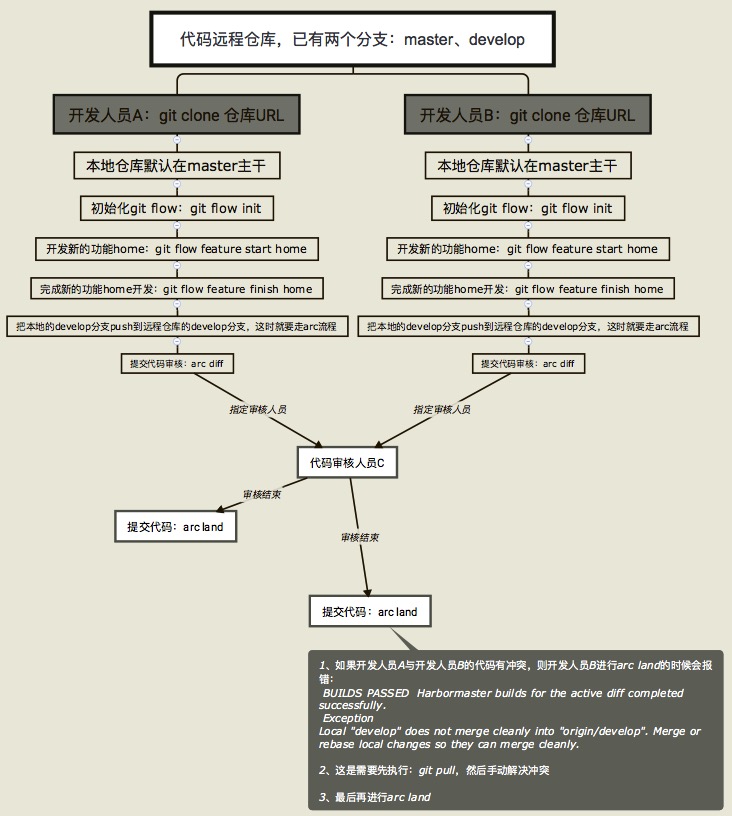
使用中出现的问题
1)arc diff过程中,出现如下错误:
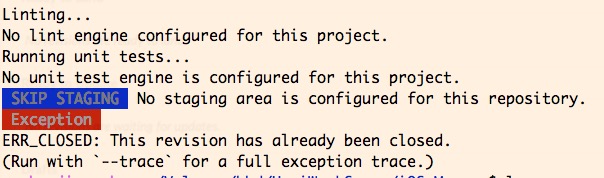
那么在arc diff加个参数
arc diff --create